Building a webclient module
When you’ve finished the server module it’s time to build a web client. We’re going to create a 3 column responsive layout with a Genre filter, artist list and artist detail view.

Our webclient framework is base on ExtJS 3.4 so you can find examples and API documentation here:
https://docs.sencha.com/extjs/3.4.0/
We’ve enhanced ExtJS with our own components and created a theme for Group Office.
The webclient code is located in the go/modules/community/music/views/extjs3” folder. The code generator already created these files:
- Module.js: Required for each module. It registers the module, entities, system and user setting panels.
- MainPanel.js: The main panel of the module shown in the Group Office UI
- scripts.txt: All js files must be listed in the correct order here.
- themes/default/style.css. Module specific style can be placed here. You can use out _base.scss file to use functions and variables from the main style.
When opening Group-Office you should see “Music” in the start menu. When opening it shows “Hello world”.
Entities
First add all entities to the module in Module.js:
go.Modules.register("community", "music", {
     mainPanel: "go.modules.community.music.MainPanel",

     //The title is shown in the menu and tab bar
     title: t("Music"),

     //All module entities must be defined here. Stores will be created for them.
     entities: ["Genre", "Artist"],

     //Put code to initialize the module here.
     initModule: function () {}
});
This will create a “go.data.EntityStore” for each entity. This store will sync all entity data. This store is kept up to date using Flux. When for example a form dialog makes a Foo/set request the store will receive the dispatched action and fire an “updated” event. All view stores connected to grids and detail views for example can observe this store and render the view on this event.
Genre filter
Create a new file GenreFilter.js:
go.modules.community.music.GenreFilter = Ext.extend(go.grid.GridPanel, {
        viewConfig: {
                forceFit: true,
                autoFill: true
        },

        //This component is going to be the side navigation
        cls: 'go-sidenav',

        constructor: function (config) {

                // Good practice to initialize config if not given
                config = config || {};

                // Row actions is a special grid column with an actions menu in it.
                var actions = this.initRowActions();

                // A selection model with checkboxes in this filter.
                var selModel = new Ext.grid.CheckboxSelectionModel();

                // A toolbar that consists out of two rows.
                var tbar = {
                        xtype: "container",
                        items:[
                                {
                                        items: config.tbar || [],
                                        xtype: 'toolbar'
                                },
                                new Ext.Toolbar({
                                        items:[{xtype: "selectallcheckbox"}]
                                })
                        ]
                };

                Ext.apply(config, {

                        tbar: tbar,

                        // We use a "go.data.Store" that connects with an Entity store. This store updates automaticaly when entities change.
                        store: new go.data.Store({
                                fields: ['id', 'name', 'aclId', "permissionLevel"],
                                entityStore: go.Stores.get("Genre")
                        }),
                        selModel: selModel,
                        plugins: [actions],
                        columns: [
                                // The checkbox selection model must be added as a column too
                                selModel,
                                {
                                        id: 'name',
                                        header: t('Name'),
                                        sortable: false,
                                        dataIndex: 'name',
                                        hideable: false,
                                        draggable: false,
                                        menuDisabled: true
                                },
                                // The actions column showing a menu with delete and edit items.
                                actions
                        ],

                        // Change to true to remember the state of the panel
                        stateful: false,
                        stateId: 'music-genre-filter'
                });

                go.modules.community.music.GenreFilter.superclass.constructor.call(this, config);
        },

        initRowActions: function () {

                var actions = new Ext.ux.grid.RowActions({
                        menuDisabled: true,
                        hideable: false,
                        draggable: false,
                        fixed: true,
                        header: '',
                        hideMode: 'display',
                        keepSelection: true,

                        actions: [{
                                        iconCls: 'ic-more-vert'
                                }]
                });

                actions.on({
                        action: function (grid, record, action, row, col, e, target) {
                                this.showMoreMenu(record, e);
                        },
                        scope: this
                });

                return actions;

        },


        showMoreMenu : function(record, e) {
                if(!this.moreMenu) {
                        this.moreMenu = new Ext.menu.Menu({
                                items: [
                                        {
                                                itemId: "edit",

                                                // We use Material design icons. Look them up at https://material.io/tools/icons/?style=baseline. You can use ic-{name} as class names.
                                                iconCls: 'ic-edit',
                                                text: t("Edit"),
                                                handler: function() {
                                                        var dlg = new go.modules.community.music.GenreForm();
                                                        dlg.load(this.moreMenu.record.id).show();
                                                },
                                                scope: this
                                        },{
                                                itemId: "delete",
                                                iconCls: 'ic-delete',
                                                text: t("Delete"),
                                                handler: function() {
                                                        Ext.MessageBox.confirm(t("Confirm delete"), t("Are you sure you want to delete this item?"), function (btn) {
                                                                if (btn != "yes") {
                                                                        return;
                                                                }
                                                                go.Stores.get("Genre").set({destroy: [this.moreMenu.record.id]});
                                                        }, this);
                                                },
                                                scope: this
                                        }
                                ]
                        })
                }

                this.moreMenu.getComponent("edit").setDisabled(record.get("permissionLevel") < GO.permissionLevels.manage);
                this.moreMenu.getComponent("delete").setDisabled(record.get("permissionLevel") < GO.permissionLevels.manage);

                this.moreMenu.record = record;

                this.moreMenu.showAt(e.getXY());
        }
});
Every Javascript file must be added to the “scripts.txt” file so add “GenreFilter.js” to the bottom of this file.
Study the component and take a look at all the comments. This component is a grid with check boxes showing all Genres.
Now add this component to the main panel by changing MainPanel.js with the following code:
go.modules.community.music.MainPanel = Ext.extend(go.panels.ModulePanel, {

        // Will make a single item fit in this panel. We'll change this later.
        layout : "fit",

        initComponent : function() {

                //create the genre filter component
                this.genreFilter = new go.modules.community.music.GenreFilter({
                        tbar : [{
                                xtype: "tbtitle",
                                text: t("Genres")
                        }]
                });

                //add it to the main panel's items.
                this.items = [this.genreFilter];

                go.modules.community.music.MainPanel.superclass.initComponent.call(this);

                this.on("afterrender", function() {

                        //when this panel renders, load the filter.
                        this.genreFilter.store.load();

                },this);
        }
});
Reload Group Office and the Music panel should now look like this:
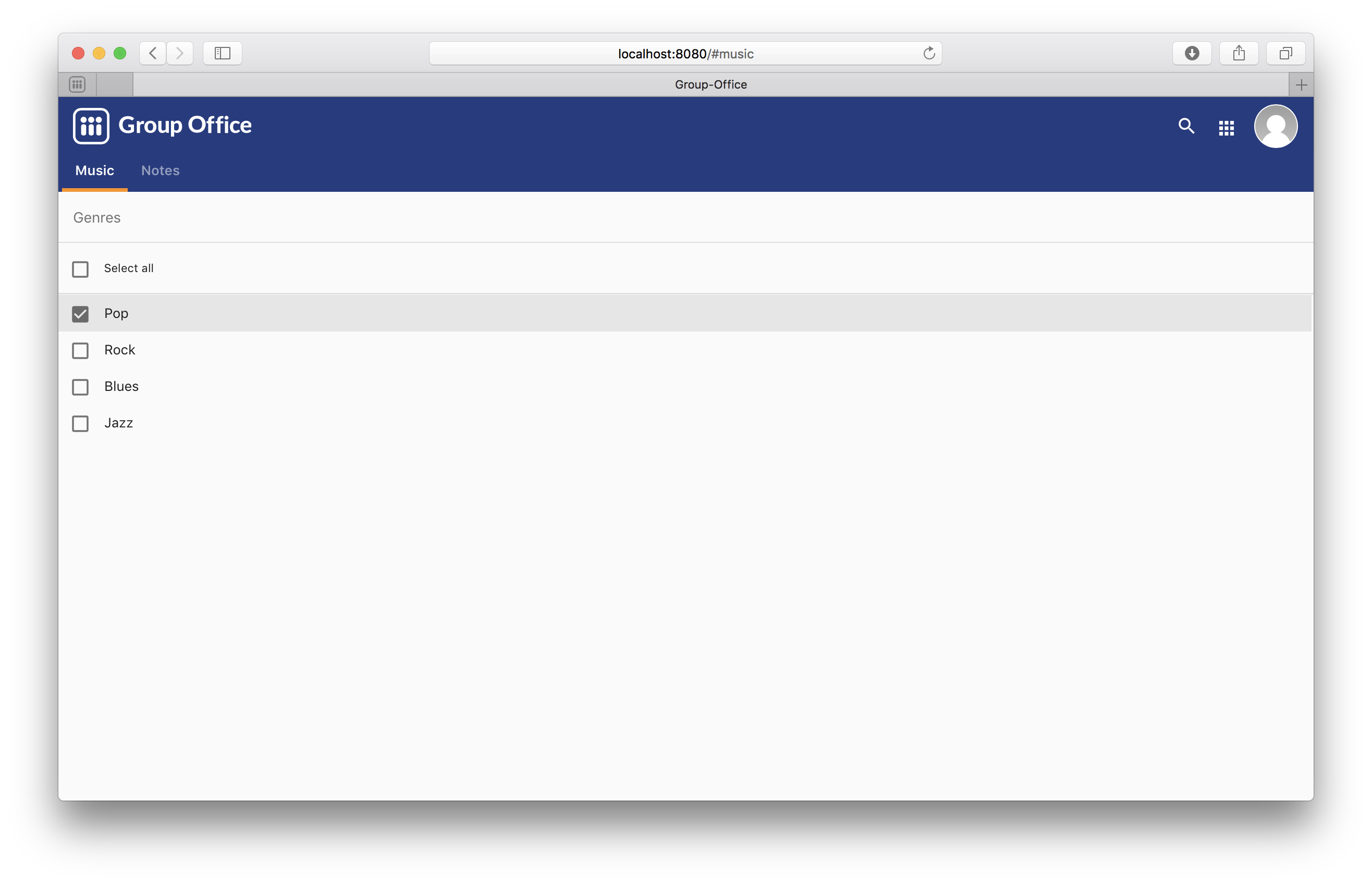
Artist grid
Now that we’ve got our Genre filter in place it’s time to create the artist grid.
Create the file ArtistGrid.js:
go.modules.community.music.ArtistGrid = Ext.extend(go.grid.GridPanel, {
        initComponent: function () {

                // Use a Group Office store that is connected with an go.data.EntityStore for automatic updates.
                this.store = new go.data.Store({
                        fields: [
                                'id',
                                'name',
                                'photo', //This is a blob id. A download URL can be retreived with go.Jmap.downloadUrl(record.data.photo)

                                {name: 'createdAt', type: 'date'},
                                {name: 'modifiedAt', type: 'date'},

                                // You can use any entity as a store data type. This will autmatically
                                // fetch the related entity by key.
                                {name: 'creator', type: go.data.types.User, key: 'createdBy'},
                                {name: 'modifier', type: go.data.types.User, key: 'modifiedBy'},

                                // Every entity has permission levels. GO.permissionLevels.read, write,
                                // writeAndDelete and manage
                                'permissionLevel'
                        ],

                        // The connected entity store. When Artists are changed the store will
                        // update automatically
                        entityStore: go.Stores.get("Artist")
                });

                Ext.apply(this, {

                        columns: [
                                {
                                        id: 'id',
                                        hidden: true,
                                        header: 'ID',
                                        width: dp(40),
                                        sortable: true,
                                        dataIndex: 'id'
                                },
                                {
                                        id: 'name',
                                        header: t('Name'),
                                        width: dp(75),
                                        sortable: true,
                                        dataIndex: 'name',
                                        renderer: function (value, metaData, record, rowIndex, colIndex, store) {

                                                //Render an avatar for the artist.
                                                var style = record.data.photo ? 'background-image: url(' + go.Jmap.downloadUrl(record.data.photo) + ')"' : '';

                                                return '<div class="user">\
                                                                                        <div class="avatar" style="' + style + '"></div>\
                                                                                        <div class="wrap single">' + record.get('name') + '</div>\
                                                                                </div>';
                                        }
                                },
                                {
                                        xtype: "datecolumn",
                                        id: 'createdAt',
                                        header: t('Created at'),
                                        width: dp(160),
                                        sortable: true,
                                        dataIndex: 'createdAt',
                                        hidden: true
                                },
                                {
                                        xtype: "datecolumn",
                                        hidden: false,
                                        id: 'modifiedAt',
                                        header: t('Modified at'),
                                        width: dp(160),
                                        sortable: true,
                                        dataIndex: 'modifiedAt'
                                },
                                {
                                        hidden: true,
                                        header: t('Created by'),
                                        width: dp(160),
                                        sortable: true,
                                        dataIndex: 'creator',
                                        renderer: function (v) {
                                                return v ? v.displayName : "-";
                                        }
                                },
                                {
                                        hidden: true,
                                        header: t('Modified by'),
                                        width: dp(160),
                                        sortable: true,
                                        dataIndex: 'modifier',
                                        renderer: function (v) {
                                                return v ? v.displayName : "-";
                                        }
                                }
                        ],

                        viewConfig: {
                                emptyText: '<i>description</i><p>' + t("No items to display") + '</p>'
                        },

                        autoExpandColumn: 'name',

                        // Change to true to remember grid state
                        stateful: false,
                        stateId: 'music-artist-grid'
                });

                go.modules.community.music.ArtistGrid.superclass.initComponent.call(this);
        }
});
And add the file “ArtistGrid.js” to the bottom of “scripts.txt”. Study the code and comments of this file.
Now change MainPanel.js to use the grid:
go.modules.community.music.MainPanel = Ext.extend(go.panels.ModulePanel, {

        // Use a responsive layout
        layout : "responsive",

        initComponent : function() {

                //create the genre filter component
                this.genreFilter = new go.modules.community.music.GenreFilter({
                        region: "west",
                        width: dp(300),

                        //render a split bar for resizing
                        split: true,

                        tbar : [{
                                xtype: "tbtitle",
                                text: t("Genres")
                        }]
                });

                //Create the artist grid
                this.artistGrid = new go.modules.community.music.ArtistGrid({
                        region: "center",

                        //toolbar with just a search component for now
                        tbar: [
                                '->',
                                {
                                        xtype: 'tbsearch'
                                }
                        ]
                });

                //add the components to the main panel's items.
                this.items = [this.genreFilter, this.artistGrid];

                // Call the parent class' initComponent
                go.modules.community.music.MainPanel.superclass.initComponent.call(this);

                //Attach lister to changes of the filter selection.
                //add buffer because it clears selection first and this would cause it to fire twice
                this.genreFilter.getSelectionModel().on('selectionchange', this.onGenreFilterChange, this, {buffer: 1});

                // Attach listener for running the module
                this.on("afterrender", this.runModule, this);
        },

        // Fired when the Genre filter selection changes
        onGenreFilterChange : function (sm) {

                var selectedRecords = sm.getSelections(),
                                        ids = selectedRecords.column('id'); //column is a special GO method that get's all the id's from the records in an array.

                this.artistGrid.store.baseParams.filter.genres = ids;
                this.artistGrid.store.load();
        },

        // Fired when the module panel is rendered.
        runModule : function() {
                // when this panel renders, load the genres and artists.
                this.genreFilter.store.load();
                this.artistGrid.store.load();
        }
});
Study this component code and comments again. The changes that are made are:
- The layout to a responsive layout so the components can be next ot each other. A responsive layout is based on Ext.layout.BorderLayout but changes into a Ext.layout.CardLayout when the device width is smaller than a specified trigger point.
- Added the Artist grid component.
- Added a listener to the Genre filter to apply the filter to the artist grid’s store parameters.
When you reload Group Office now it should look like this:
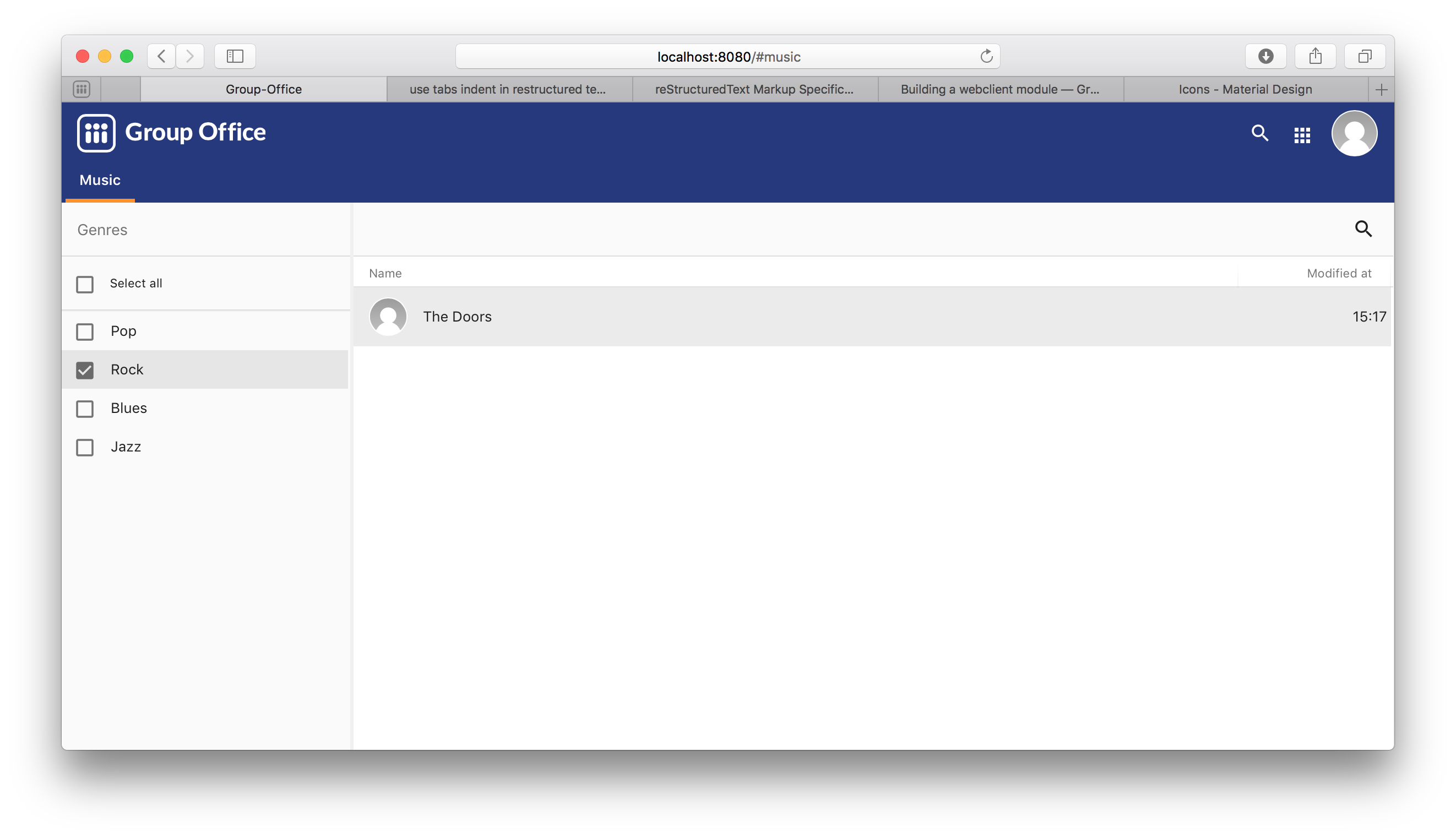
Note
Feel free to add some more artist with postman so your filter results are more interesting :)
Genre combo box
Before we can create an Artist dialog we’ll need a Genre combo box for selecting the album genre. Create the file GenreCombo.js:
go.modules.community.music.GenreCombo = Ext.extend(go.form.ComboBox, {
        fieldLabel: t("Genre"),
        hiddenName: 'genreId',
        anchor: '100%',
        emptyText: t("Please select..."),
        pageSize: 50,
        valueField: 'id',
        displayField: 'name',
        triggerAction: 'all',
        editable: true,
        selectOnFocus: true,
        forceSelection: true,
        allowBlank: false,
        initComponent: function () {

                //Add the store on init so that the entity store is loaded
                Ext.applyIf(this, {
                        store: new go.data.Store({
                                fields: ['id', 'name'],
                                entityStore: go.Stores.get("Genre")
                        })
                });

                go.modules.community.music.GenreCombo.superclass.initComponent.call(this);
        }
});

// Register an xtype so we can use the component easily.
Ext.reg("genrecombo", go.modules.community.music.GenreCombo);
Study the component and add it to the scripts.txt file.
Artist dialog
Now we need an Artist dialog for creating and editing Artists.
Create a file called “ArtistDialog.js”:
go.modules.community.music.ArtistDialog = Ext.extend(go.form.Dialog, {
        // Change to true to remember state
        stateful: false,
        stateId: 'music-aritst-dialog',
        title: t('Artist'),

        //The dialog set's entities in an go.data.EntityStore. This store notifies all
        //connected go.data.Store view stores to update.
        entityStore: go.Stores.get("Artist"),
        autoHeight: true,

        // return an array of form items here.
        initFormItems: function () {
                return [{
                                // it's recommended to wrap all fields in field sets for consistent style.
                                xtype: 'fieldset',
                                title: t("Artist information"),
                                items: [{
                                                // The go.form.FileField component can handle "blob" fields.
                                                xtype: "filefield",
                                                hideLabel: true,
                                                buttonOnly: true,
                                                name: 'photo',
                                                height: dp(120),
                                                cls: "avatar",
                                                autoUpload: true,
                                                buttonCfg: {
                                                        text: '',
                                                        width: dp(120)
                                                },
                                                setValue: function (val) {
                                                        if (this.rendered && !Ext.isEmpty(val)) {
                                                                this.wrap.setStyle('background-image', 'url(' + go.Jmap.downloadUrl(val) + ')');
                                                        }
                                                        go.form.FileField.prototype.setValue.call(this, val);
                                                },
                                                accept: 'image/*'
                                        },

                                        {
                                                xtype: 'textfield',
                                                name: 'name',
                                                fieldLabel: t("Name"),
                                                anchor: '100%',
                                                allowBlank: false
                                        }]
                        },

                        {
                                xtype: "fieldset",
                                title: t("Albums"),

                                items: [
                                        {
                                                //For relational properties we can use the "go.form.FormGroup" component.
                                                //It's a sub form for the "albums" array property.

                                                xtype: "formgroup",
                                                name: "albums",
                                                hideLabel: true,

                                                // this will add dp(16) padding between rows.
                                                pad: true,

                                                //the itemCfg is used to create a component for each "album" in the array.
                                                itemCfg: {
                                                        layout: "form",
                                                        defaults: {
                                                                anchor: "100%"
                                                        },
                                                        items: [{
                                                                        xtype: "textfield",
                                                                        fieldLabel: t("Name"),
                                                                        name: "name"
                                                                },

                                                                {
                                                                        xtype: "datefield",
                                                                        fieldLabel: t("Release date"),
                                                                        name: "releaseDate"
                                                                },

                                                                {
                                                                        xtype: "genrecombo"
                                                                }
                                                        ]
                                                }
                                        }
                                ]
                        }
                ];
        }
});
Add this file to the “scripts.txt” file again.
Then update MainPanel.js:
go.modules.community.music.MainPanel = Ext.extend(go.panels.ModulePanel, {

        // Use a responsive layout
        layout : "responsive",

        initComponent : function() {

                //create the genre filter component
                this.genreFilter = new go.modules.community.music.GenreFilter({
                        region: "west",
                        width: dp(300),

                        //render a split bar for resizing
                        split: true,

                        tbar : [{
                                xtype: "tbtitle",
                                text: t("Genres")
                        }]
                });

                //Create the artist grid
                this.artistGrid = new go.modules.community.music.ArtistGrid({
                        region: "center",

                        //toolbar with just a search component for now
                        tbar: [
                                '->',
                                {
                                        xtype: 'tbsearch'
                                },

                                // add button for creating new artists
                                this.addButton = new Ext.Button({
                                        iconCls: 'ic-add',
                                        tooltip: t('Add'),
                                        handler: function (btn) {
                                                var dlg = new go.modules.community.music.ArtistDialog({
                                                        formValues: {
                                                                // you can pass form values like this
                                                        }
                                                });
                                                dlg.show();
                                        },
                                        scope: this
                                })
                        ],

                        listeners: {
                                rowdblclick: this.onGridDblClick,
                                scope: this
                        }
                });

                //add the components to the main panel's items.
                this.items = [this.genreFilter, this.artistGrid];

                // Call the parent class' initComponent
                go.modules.community.music.MainPanel.superclass.initComponent.call(this);

                //Attach lister to changes of the filter selection.
                //add buffer because it clears selection first and this would cause it to fire twice
                this.genreFilter.getSelectionModel().on('selectionchange', this.onGenreFilterChange, this, {buffer: 1});

                // Attach listener for running the module
                this.on("afterrender", this.runModule, this);
        },

        // Fired when the Genre filter selection changes
        onGenreFilterChange : function (sm) {

                var selectedRecords = sm.getSelections(),
                                        ids = selectedRecords.column('id'); //column is a special GO method that get's all the id's from the records in an array.

                this.artistGrid.store.baseParams.filter.genres = ids;
                this.artistGrid.store.load();
        },

        // Fired when the module panel is rendered.
        runModule : function() {
                // when this panel renders, load the genres and artists.
                this.genreFilter.store.load();
                this.artistGrid.store.load();
        },


        // Fires when an artist is double clicked in the grid.
        onGridDblClick : function (grid, rowIndex, e) {

                //check permissions
                var record = grid.getStore().getAt(rowIndex);
                if (record.get('permissionLevel') < GO.permissionLevels.write) {
                        return;
                }

                // Show dialog
                var dlg = new go.modules.community.music.ArtistDialog();
                dlg.load(record.id).show();
        }
});
Study the changes in the component:
- Added an Add button in the grid’s toolbar.
- Added a double click listener to the grid to edit an Artist.
When you reload Group Office now it should look like this:

Delete button
You can add a delete button to the grid’s toolbar in MainPanel.js to delete selected aritsts:
{
        iconCls: 'ic-more-vert',
        menu: [
                {
                        itemId: "delete",
                        iconCls: 'ic-delete',
                        text: t("Delete"),
                        handler: function () {
                                this.artistGrid.deleteSelected();
                        },
                        scope: this
                }
        ]
}
Detail view
Finally we’re going to add a details view for artists.
Create the file “ArtistDetail.js”:
go.modules.community.music.ArtistDetail = Ext.extend(go.panels.DetailView, {

        // The entity store is connected. The detail view is automatically updated.
        entityStore: go.Stores.get("Artist"),

        //set to true to enable state saving
        stateful: false,
        stateId: 'music-contact-detail',

        initComponent: function () {
                this.tbar = this.initToolbar();

                Ext.apply(this, {
                        // all items are updated automatically if they have a "tpl" (Ext.XTemplate) property or an "onLoad" function. The panel is passed as argument.
                        items: [

                                //Artist name component
                                {
                                        cls: 'content',
                                        xtype: 'box',
                                        tpl: '<h3>{name}</h3>'
                                },

                                //Render the avatar
                                {
                                        xtype: "box",
                                        cls: "content",
                                        tpl: new Ext.XTemplate('<div class="go-detail-view-avatar">\
<div class="avatar" style="{[this.getStyle(values.photo)]}"></div></div>',
                                        {
                                                getCls: function (isOrganization) {
                                                        return isOrganization ? "organization" : "";
                                                },
                                                getStyle: function (photoBlobId) {
                                                        return photoBlobId ? 'background-image: url(' + go.Jmap.downloadUrl(photoBlobId) + ')"' : "";
                                                }
                                        })
                                },

                                // Albums component
                                {
                                        collapsible: true,
                                        title: t("Albums"),
                                        xtype: "panel",

                                        //onLoad is called on each item. The DetailView is passed as argument
                                        onLoad : function(dv) {
                                                this.setVisible(dv.data.albums.length);
                                                if(!dv.data.albums.length) {
                                                        return;
                                                }

                                                if(!this.template) {
                                                        this.template = new Ext.XTemplate('<div class="icons">\
                                        <tpl for=".">\
                                                <p class="s6"><tpl if="xindex == 1"><i class="icon label">album</i></tpl>\
                                                        <span>{name}</span>\
                                                        <label>{[GO.util.dateFormat(values.releaseDate)]} - {[go.Stores.get("Genre").get([values.genreId])[0].name]}</label>\
                                                </p>\
                                        </tpl>\
                                        </div>').compile();
                                                }

                                                //make sure genres are loaded before rendering the album template
                                                var ids = dv.data.albums.column('genreId');

                                                go.Stores.get("Genre").get(ids, function(genres) {
                                                        this.update(this.template.apply(dv.data.albums));
                                                }, this);
                                        }
                                }
                        ]
                });


                go.modules.community.music.ArtistDetail.superclass.initComponent.call(this);

        },

        onLoad: function () {

                // Enable edit button according to permission level.
                this.getTopToolbar().getComponent("edit").setDisabled(this.data.permissionLevel < GO.permissionLevels.write);
                this.deleteItem.setDisabled(this.data.permissionLevel < GO.permissionLevels.writeAndDelete);

                go.modules.community.music.ArtistDetail.superclass.onLoad.call(this);
        },

        initToolbar: function () {

                var items = this.tbar || [];

                items = items.concat([
                        '->',
                        {
                                itemId: "edit",
                                iconCls: 'ic-edit',
                                tooltip: t("Edit"),
                                handler: function (btn, e) {
                                        var dlg = new go.modules.community.music.ArtistDialog();
                                        dlg.show();
                                        dlg.load(this.data.id);
                                },
                                scope: this
                        },

                        {

                                iconCls: 'ic-more-vert',
                                menu: [
                                        {
                                                iconCls: "btn-print",
                                                text: t("Print"),
                                                handler: function () {
                                                        this.body.print({title: this.data.name});
                                                },
                                                scope: this
                                        },
                                        '-',
                                        this.deleteItem = new Ext.menu.TextItem({
                                                itemId: "delete",
                                                iconCls: 'ic-delete',
                                                text: t("Delete"),
                                                handler: function () {
                                                        Ext.MessageBox.confirm(t("Confirm delete"), t("Are you sure you want to delete this item?"), function (btn) {
                                                                if (btn != "yes") {
                                                                        return;
                                                                }
                                                                this.entityStore.set({destroy: [this.currentId]});
                                                        }, this);
                                                },
                                                scope: this
                                        })

                                ]
                        }]);

                var tbarCfg = {
                        disabled: true,
                        items: items
                };

                return new Ext.Toolbar(tbarCfg);
        }
});
Study the code and add it to “scripts.txt”. Now we’re going to update the MainPanel.js file:
go.modules.community.music.MainPanel = Ext.extend(go.panels.ModulePanel, {

        // Use a responsive layout
        layout: "responsive",

        // change responsive mode on 1000 pixels
        layoutConfig: {
                triggerWidth: 1000
        },

        initComponent: function () {

                //create the genre filter component
                this.genreFilter = new go.modules.community.music.GenreFilter({
                        region: "west",
                        width: dp(300),

                        //render a split bar for resizing
                        split: true,

                        tbar: [{
                                        xtype: "tbtitle",
                                        text: t("Genres")
                                },
                                '->',

                                //add back button for smaller screens
                                {
                                        //this class will hide it on larger screens
                                        cls: 'go-narrow',
                                        iconCls: "ic-arrow-forward",
                                        tooltip: t("Artists"),
                                        handler: function () {
                                                this.artistGrid.show();
                                        },
                                        scope: this
                                }
                        ]
                });

                //Create the artist grid
                this.artistGrid = new go.modules.community.music.ArtistGrid({
                        region: "center",

                        tbar: [
                                //add a hamburger button for smaller screens
                                {
                                        //this class will hide the button on large screens
                                        cls: 'go-narrow',
                                        iconCls: "ic-menu",
                                        handler: function () {
                                                this.genreFilter.show();
                                        },
                                        scope: this
                                },
                                '->',
                                {
                                        xtype: 'tbsearch'
                                },

                                // add button for creating new artists
                                this.addButton = new Ext.Button({
                                        iconCls: 'ic-add',
                                        tooltip: t('Add'),
                                        handler: function (btn) {
                                                var dlg = new go.modules.community.music.ArtistDialog({
                                                        formValues: {
                                                                // you can pass form values like this
                                                        }
                                                });
                                                dlg.show();
                                        },
                                        scope: this
                                }),
                                {
                                        iconCls: 'ic-more-vert',
                                        menu: [
                                                {
                                                        itemId: "delete",
                                                        iconCls: 'ic-delete',
                                                        text: t("Delete"),
                                                        handler: function () {
                                                                this.artistGrid.deleteSelected();
                                                        },
                                                        scope: this
                                                }
                                        ]
                                }
                        ],

                        listeners: {
                                rowdblclick: this.onGridDblClick,
                                scope: this
                        }
                });

                // Every entity automatically configures a route. Route to the entity when selecting it in the grid.
                this.artistGrid.on('navigate', function (grid, rowIndex, record) {
                        go.Router.goto("artist/" + record.id);
                }, this);

                // Create artist detail component
                this.artistDetail = new go.modules.community.music.ArtistDetail({
                        region: "center",
                        tbar: [
                                //add a back button for small screens
                                {
                                        // this class will hide the button on large screens
                                        cls: 'go-narrow',
                                        iconCls: "ic-arrow-back",
                                        handler: function () {
                                                this.westPanel.show();
                                        },
                                        scope: this
                                }]
                });

                //Wrap the grids into another panel with responsive layout for the 3 column responsive layout to work.
                this.westPanel = new Ext.Panel({
                        region: "west",
                        layout: "responsive",
                        stateId: "go-music-west",
                        split: true,
                        width: dp(800),
                        narrowWidth: dp(500), //this will only work for panels inside another panel with layout=responsive. Not ideal but at the moment the only way I could make it work
                        items: [
                                this.artistGrid, //first item is shown as default in narrow mode.
                                this.genreFilter
                        ]
                });

                //add the components to the main panel's items.
                this.items = [
                        this.westPanel, //first is default in narrow mode
                        this.artistDetail
                ];

                // Call the parent class' initComponent
                go.modules.community.music.MainPanel.superclass.initComponent.call(this);

                //Attach lister to changes of the filter selection.
                //add buffer because it clears selection first and this would cause it to fire twice
                this.genreFilter.getSelectionModel().on('selectionchange', this.onGenreFilterChange, this, {buffer: 1});

                // Attach listener for running the module
                this.on("afterrender", this.runModule, this);
        },

        // Fired when the Genre filter selection changes
        onGenreFilterChange: function (sm) {

                var selectedRecords = sm.getSelections(),
                                                ids = selectedRecords.column('id'); //column is a special GO method that get's all the id's from the records in an array.

                this.artistGrid.store.baseParams.filter.genres = ids;
                this.artistGrid.store.load();
        },

        // Fired when the module panel is rendered.
        runModule: function () {
                // when this panel renders, load the genres and artists.
                this.genreFilter.store.load();
                this.artistGrid.store.load();
        },

        // Fires when an artist is double clicked in the grid.
        onGridDblClick: function (grid, rowIndex, e) {

                //check permissions
                var record = grid.getStore().getAt(rowIndex);
                if (record.get('permissionLevel') < GO.permissionLevels.write) {
                        return;
                }

                // Show dialog
                var dlg = new go.modules.community.music.ArtistDialog();
                dlg.load(record.id).show();
        }
});
The changes:
- Added a layout trigger width
- Added the detail view component and wrapped the grids in a new panel. So that we have two responsive panels one reacting for tables and the other one switching for phones.
- Added buttons for navigating on smaller screens. See the new buttons with the “go-narrow” class on them.
- We’ve added a row select listener to naviate to the artist page using the router.
When you reload Group Office it should look like this:
And on tablets:
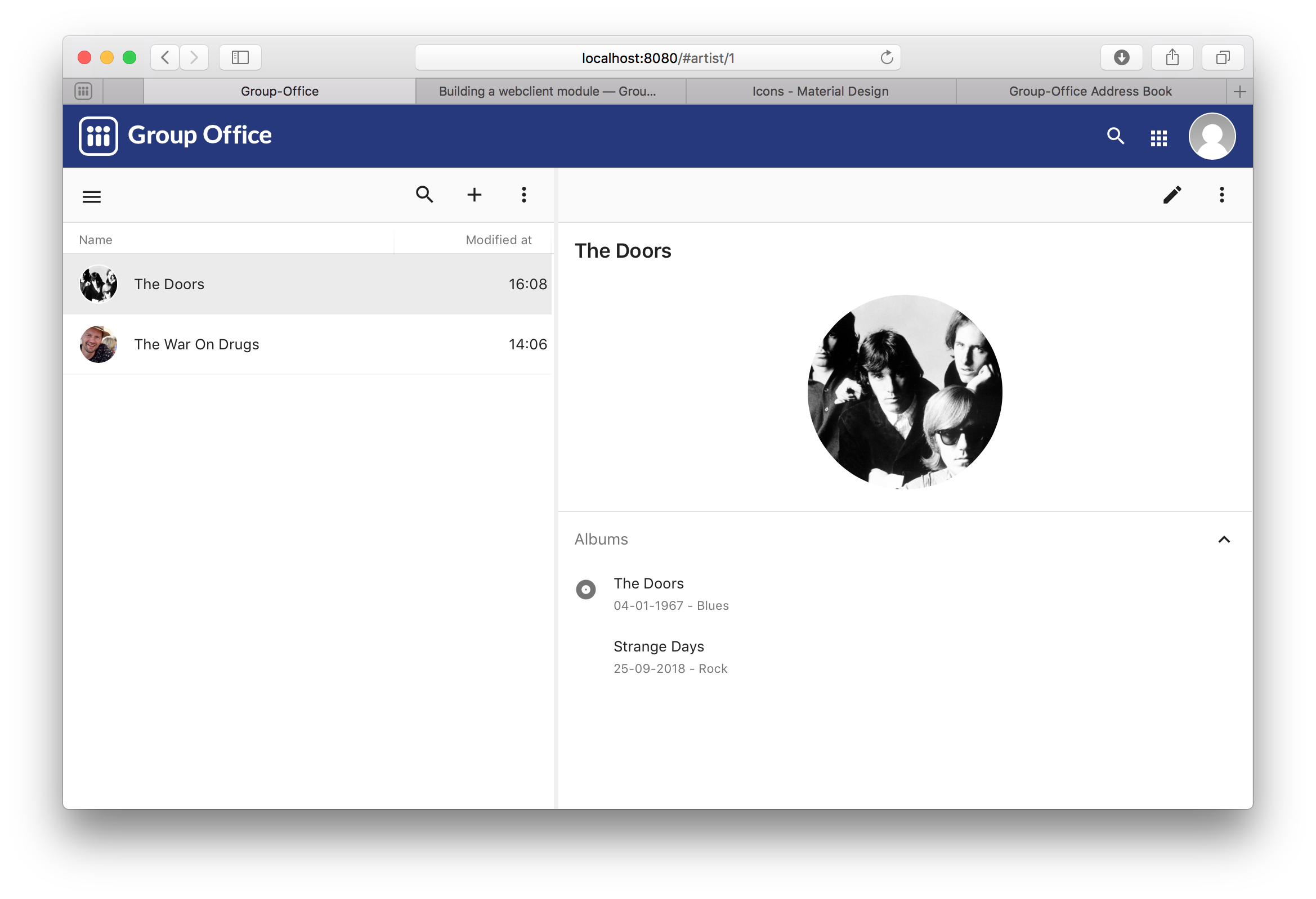
And on phones:
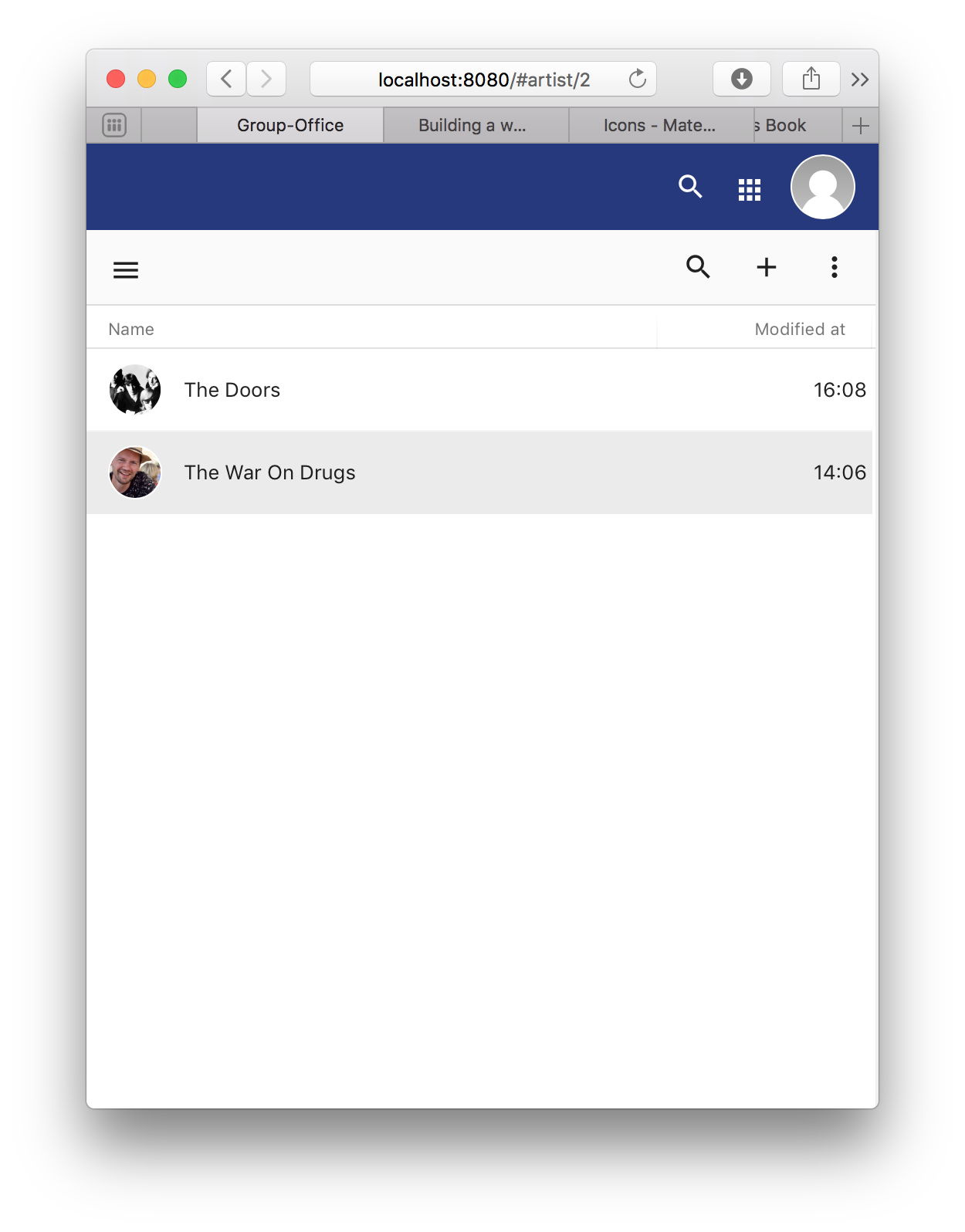
The end
You’re done! You’ve now learned how to build a simple Group Office module!